
Review Report
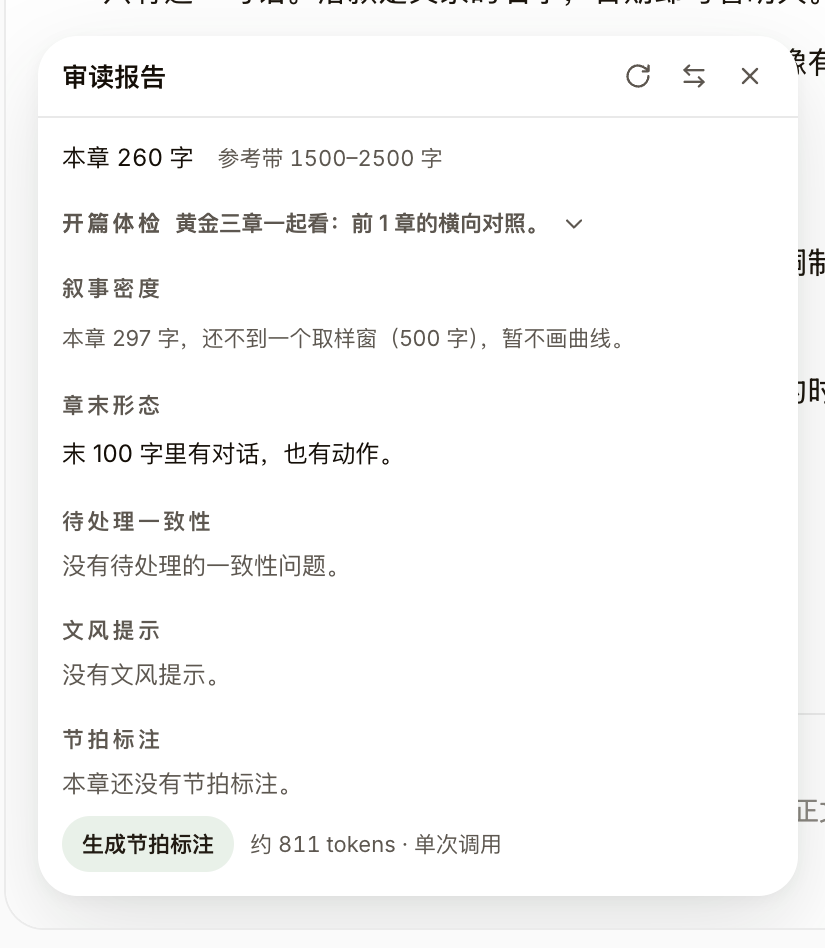
Finished a chapter and want a quick self-check? The "Review report" in the chapter menu gathers opening checkup, narrative density, beats, and consistency to-dos into one floating panel — all derived locally, and reading the report costs nothing.
Steps
- Click the "…" chapter menu at the top of the editor and choose "Review report"; if this chapter has pending consistency findings, the menu item shows a numbered badge.
- The top of the report shows chapter word count against reference bands; for the first three chapters an extra "Opening checkup" compares the golden three chapters side by side on end-of-chapter hooks, first-turn position, density, and length bands.
- "Narrative density" renders dialogue share, average sentence length, paragraph length, and vocabulary variety as four sparklines; the dashed band is this chapter’s own variation, not a pass line.
- "Generate beat annotations" has the AI tag the whole chapter with beats like Setup, Suppression, Face-smack, Reveal, Turn, and Chapter hook — the only action in the report that costs a model call, with an approximate token estimate shown before you click.